Might & Magic: Fates Companion

Master Every Match with FatesForge

The ultimate tracker for Might & Magic: Fates. Real-time match tracking, in-game overlay, card performance analytics, and deck insights. Free to use, with PRO features for the competitive edge.

matches tracked
·
active players
·
decks analyzed
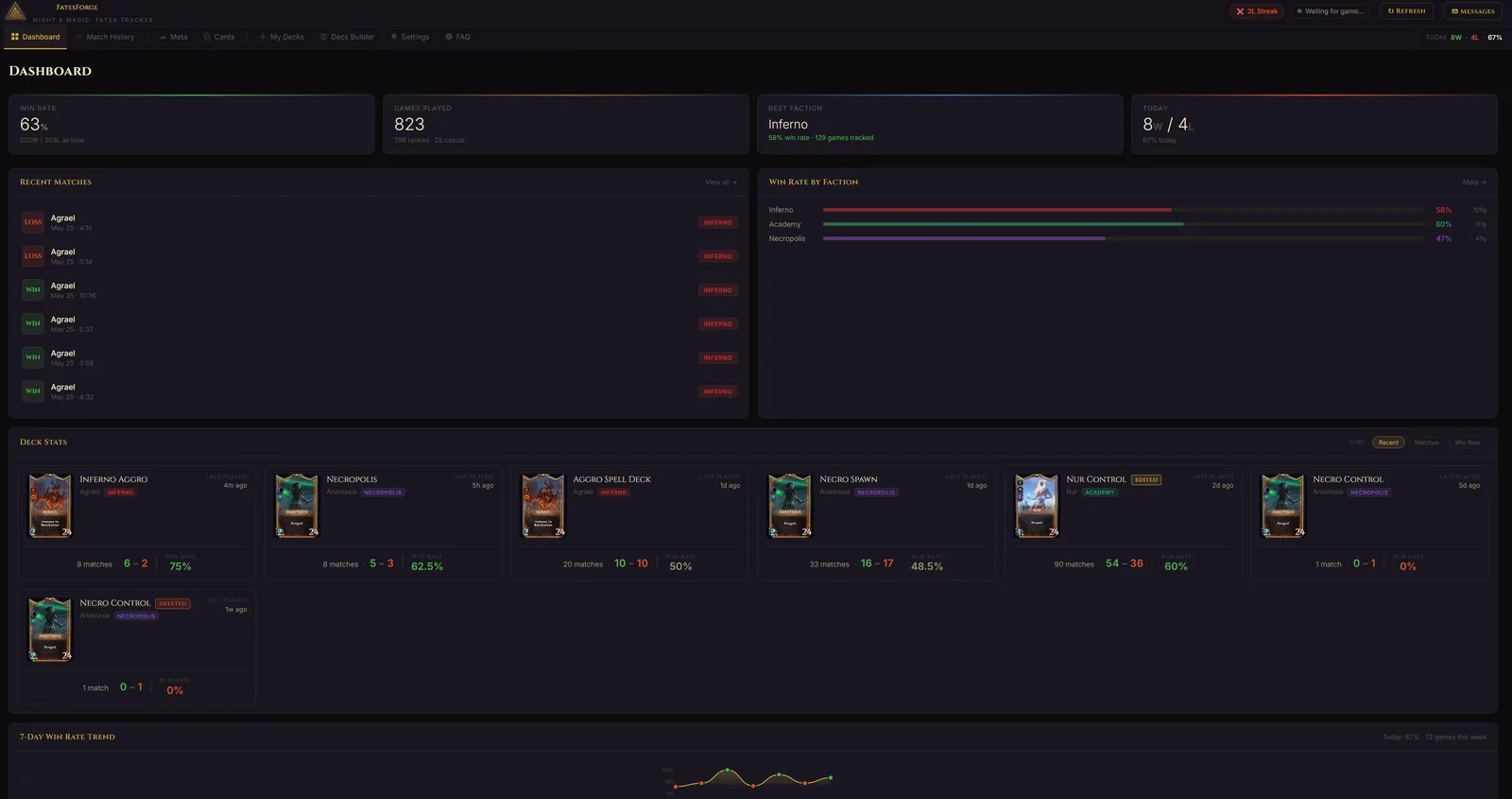
FatesForge Dashboard - Win rate tracking, match history, card stats for Might and Magic Fates

Dashboard — Win rate, recent matches, faction stats, card performance at a glance

Everything You Need to Dominate

From match tracking to deep card analytics, FatesForge gives you the competitive edge.

Live Match Tracking

Automatic game detection and real-time tracking of every match. Cards played, turns taken, win/loss -- all captured automatically. Just launch and play.

Match History

Complete history of all your matches with hero, faction, opponent, duration, and result. Sort, filter, and review your journey over time.

Dashboard Analytics

At-a-glance performance overview with win rate, games played, faction breakdown, and session stats. Your competitive profile at a glance.

👁

In-Game Overlay

Transparent overlay showing your remaining deck sorted by gold cost with rarity indicators, and opponent's played cards during matches. Draggable panels with card images that stay out of your way.

Card Performance Stats

Detailed card analytics including drawn win rate, played win rate, and mulligan keep rate. Know exactly which cards carry your games.

My Decks

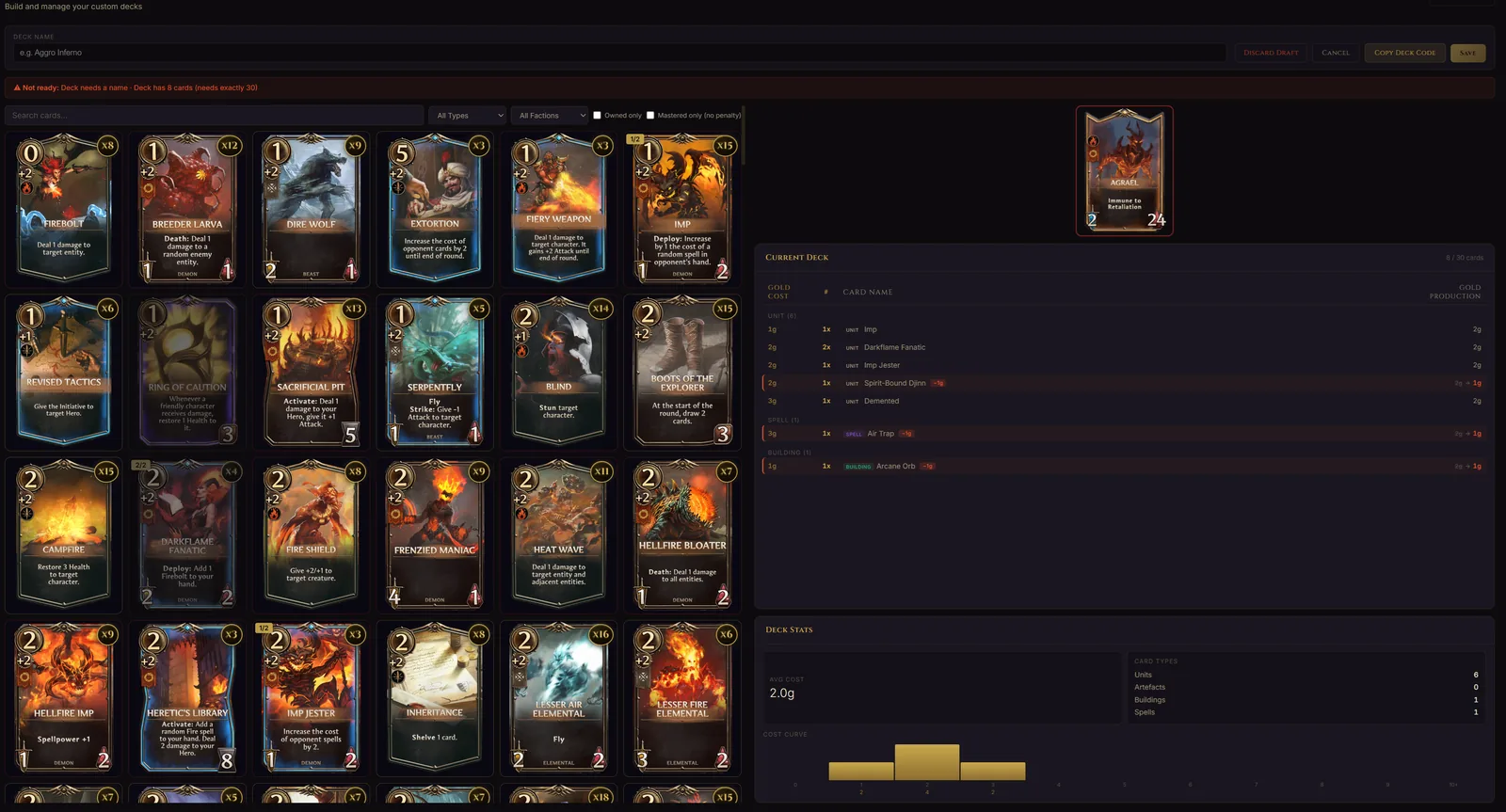
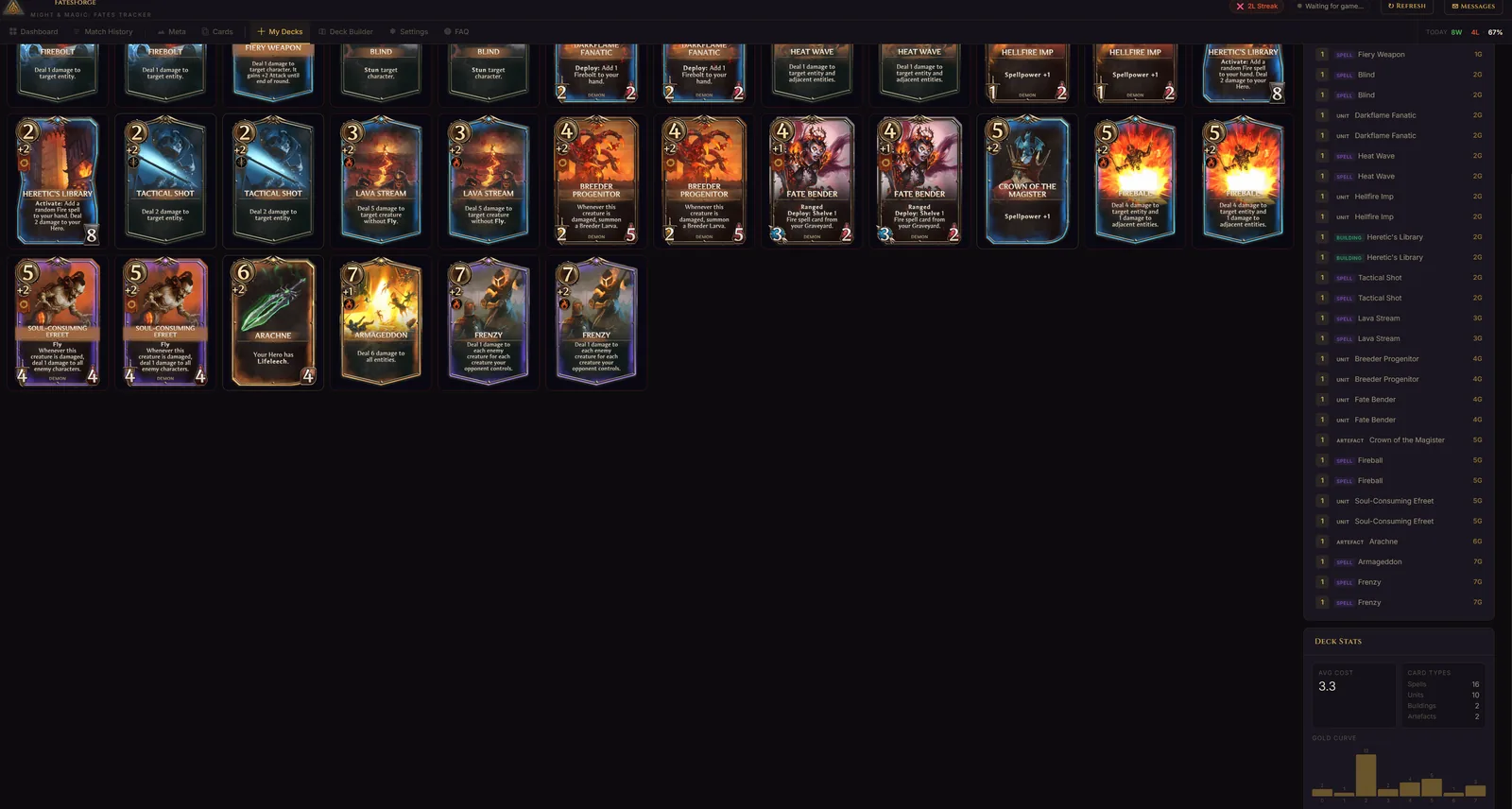
View all your decks with card images, gold curve visualization, type breakdown, and average cost. Understand your deck composition at a glance.

Meta Analysis

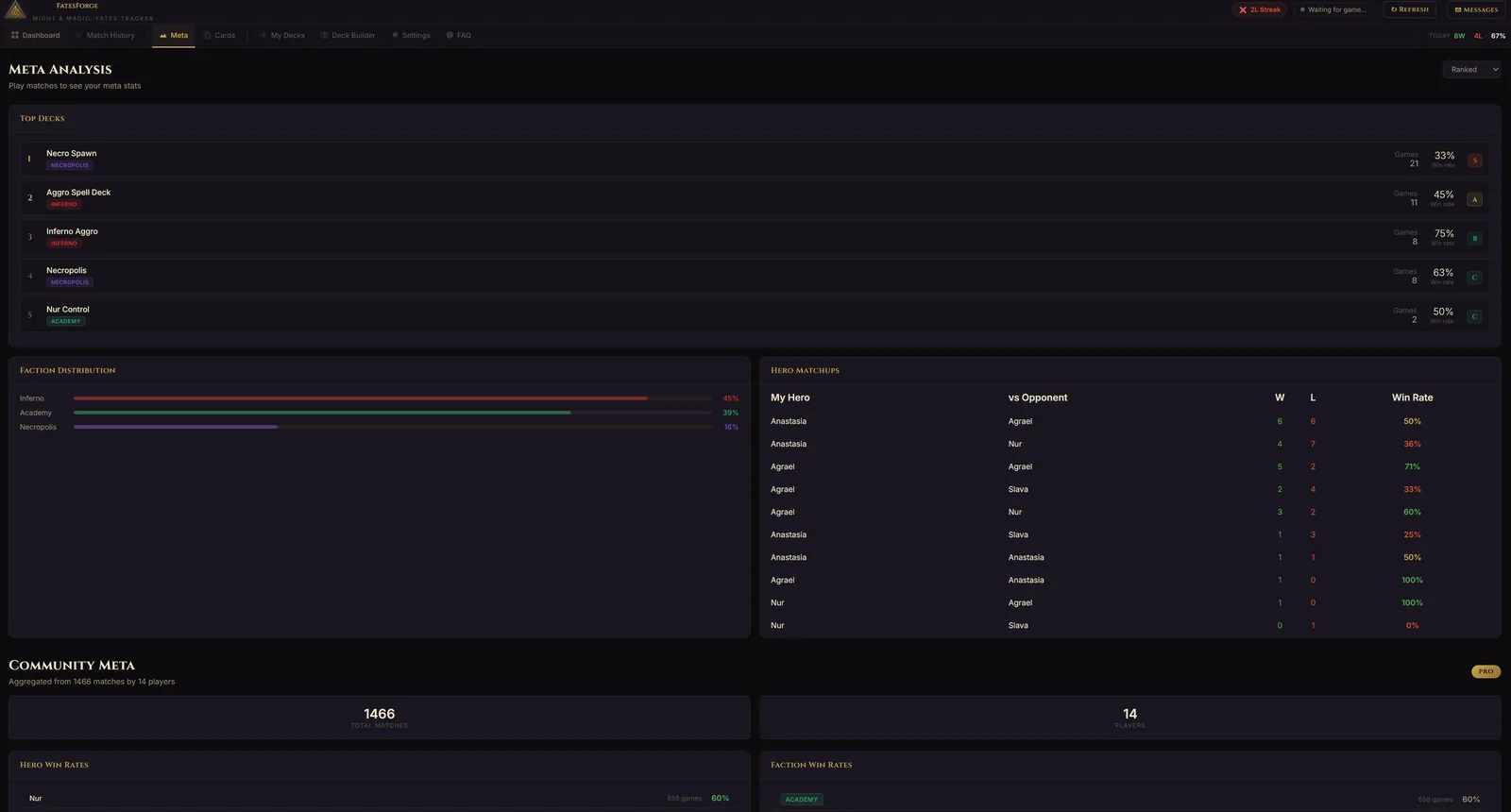
Hero matchup tracking, faction win rates, and top deck performance. Understand the competitive landscape and adapt your strategy.

Cloud Backup

Your match history, card stats, and deck data backed up to the cloud. Reinstall or switch machines without losing a single game of progress.

Auto-Updates

The tracker checks for updates automatically and installs them with one click. Always stay on the latest version with new features and fixes.

Deck Import & Export

Share decks with other players using compact FatesForge deck codes. Copy a code, send it on Discord, and your friend can import it instantly.

Sortable Card Stats

Click any column header to sort your card stats by drawn win rate, played win rate, mulligan rate, or games seen. Hover over cards for a full card preview.

Win Rate Trends

7-day sparkline chart showing your win rate over time. Hover over each day for detailed stats. Track your improvement at a glance.

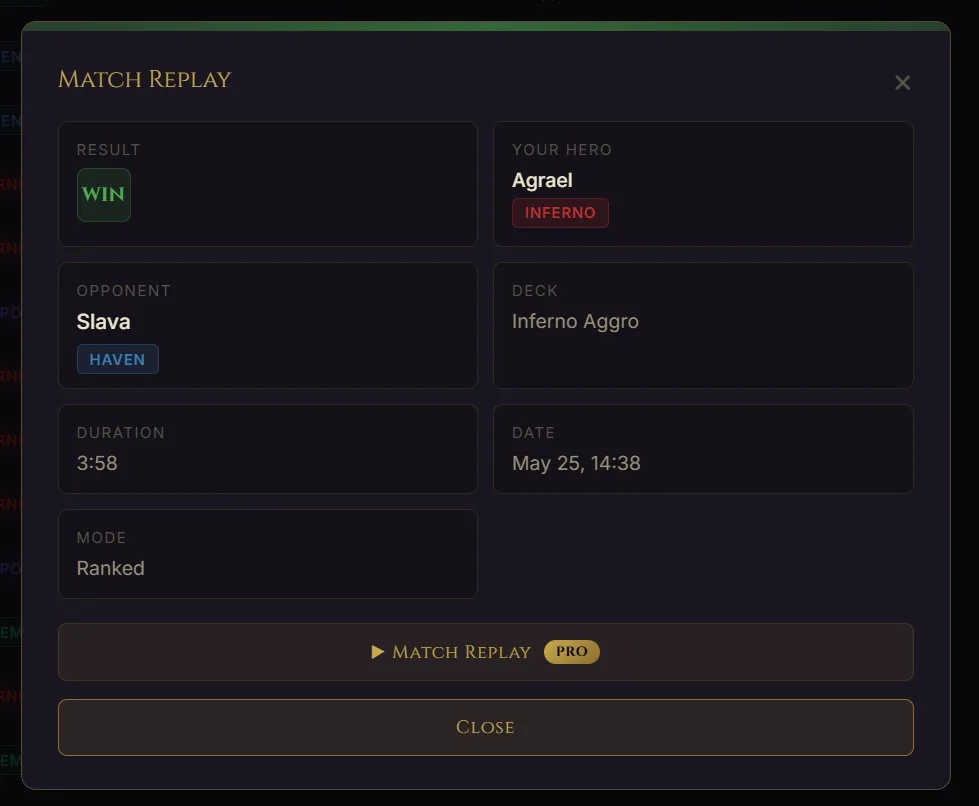
Match Replay

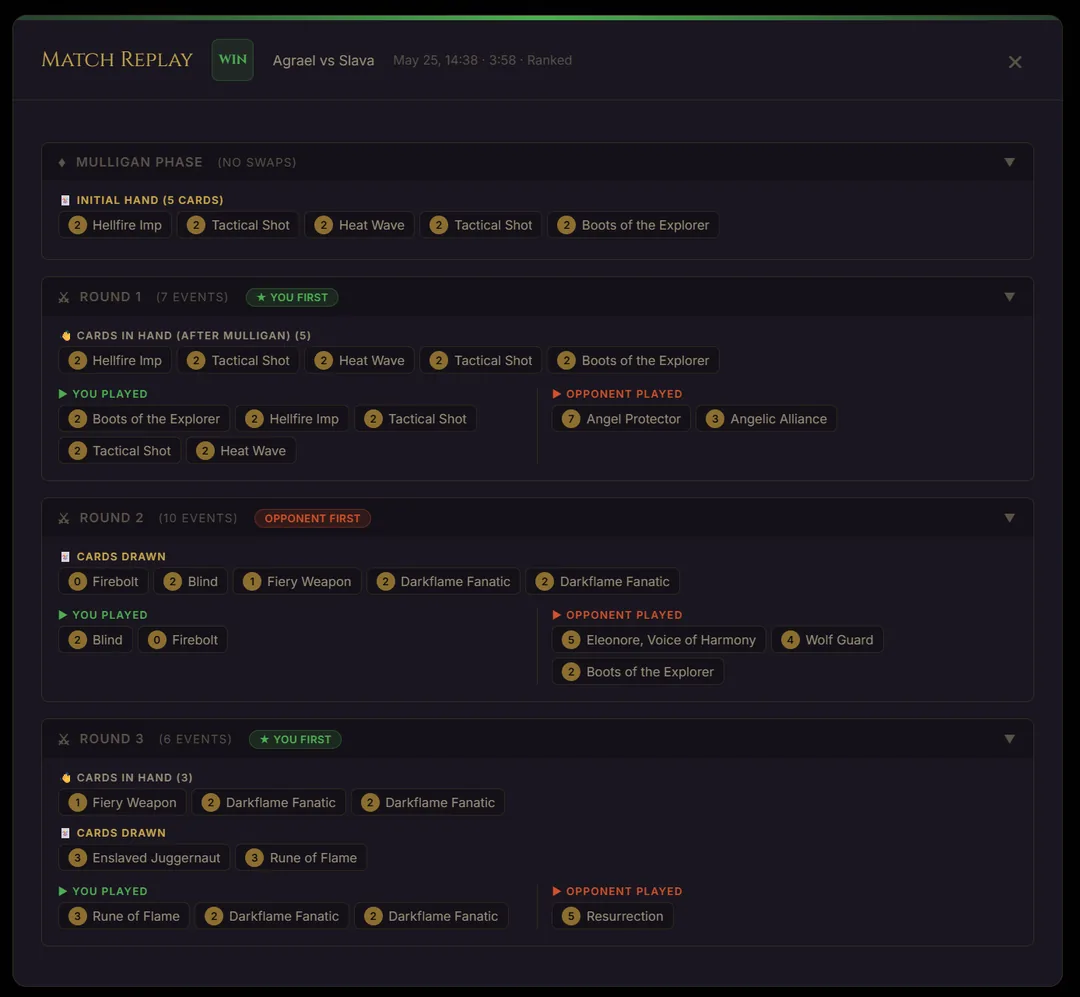
Turn-by-turn match replay showing mulligan choices, cards drawn each round, cards played by both players, and who had initiative. Review every decision you made.

Card Collection

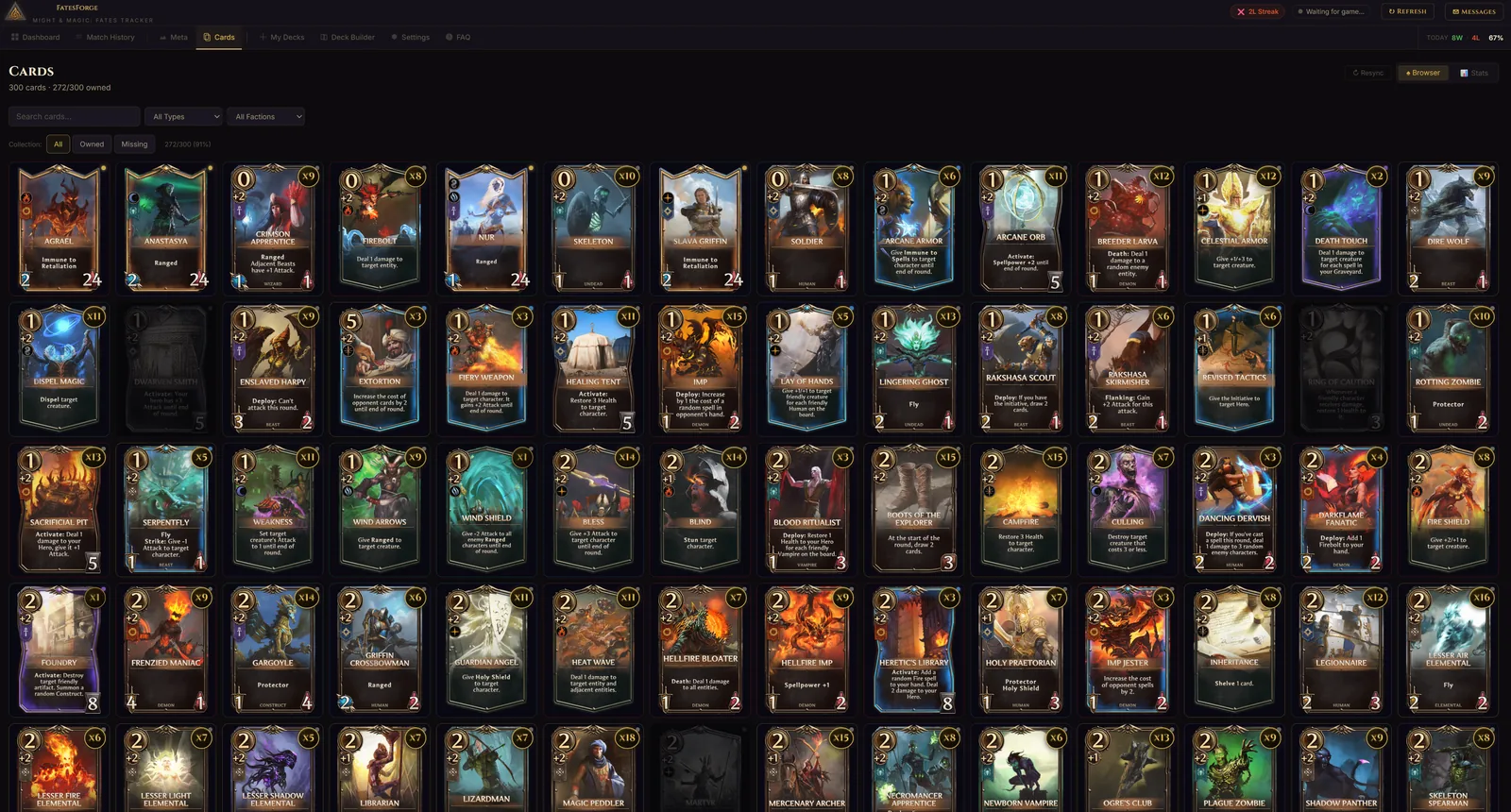
Browse your complete card collection with all 273 cards. Filter by faction, type, and ownership. See which cards you own and which ones you're missing.

Deck Builder

Build and edit decks with a visual drag-and-drop interface. Browse all cards, filter by faction, type, and cost, and craft the perfect deck before heading into battle.

Community Meta

Aggregated deck archetypes and win rates from all FatesForge users. See what the best players are running, discover top-performing decks, and stay ahead of the meta.

Up and Running in 60 Seconds

No account required. No game files modified. Just install and play.

1

Download & Install

Download the installer, run it, and launch FatesForge. That's it.

2

Launch Your Game

FatesForge automatically detects when Might & Magic: Fates is running and starts tracking instantly. No buttons to click.

3

Play & Analyze

Every match is tracked automatically. Review your stats, deck performance, and card analytics after each game.

Match History

Track Every Game

Complete history of all your matches. Filter by faction, result, or mode. Sort by any column. Every detail recorded automatically.

FatesForge Match History - Complete match history with filters for Might and Magic Fates

Match History — Filter by faction, result, mode. Sort by any column. Export to CSV.

Meta Analysis

Understand the Meta

Top decks, hero matchups, faction distribution, and community-wide meta data from all FatesForge users.

FatesForge Meta Analysis - Top decks and faction distribution for Might and Magic Fates
FatesForge Community Meta - Hero matchups, community decks and win rates for Might and Magic Fates

Meta Analysis — Top decks, faction breakdown

Community Meta — Hero matchups, top community decks

Deck Analytics

Know Your Deck Inside Out

Card images, gold curve, type breakdown, and shareable deck codes. See every card in your deck at a glance.

FatesForge My Decks - Card images, gold curve and deck analytics for Might and Magic Fates

My Decks — Full card images, deck list, gold curve, type breakdown, average cost

Match Replay PRO

Relive Every Match

Turn-by-turn match replay with mulligan phase, cards drawn, cards played by both sides, and initiative tracking. Review every decision.

FatesForge Match Replay - Turn by turn match replay with mulligan and initiative tracking for Might and Magic Fates

Match Replay — Mulligan choices, round-by-round plays, initiative tracking

Card Collection

Browse Every Card

All 273 cards with full art, stats, and abilities. Filter by faction, type, and ownership. Track your collection progress.

FatesForge Card Collection - Browse all cards with filters for Might and Magic Fates

Card Collection — All 273 cards, filter by faction and type, track owned vs missing

Frequently Asked Questions

Everything you need to know about FatesForge Tracker.

What is FatesForge?
FatesForge is a free desktop companion app for Might & Magic: Fates, the strategy trading card game by Ubisoft. It automatically tracks your matches, shows an in-game overlay with your deck and opponent's played cards, and provides detailed card performance analytics to help you improve your gameplay.
Is FatesForge free?
Yes! The core features are completely free: live match tracking, match history, dashboard analytics, in-game overlay, and automatic game detection. PRO features like card performance stats, deck analytics, meta analysis, and cloud backup are available for a one-time payment of €5/month with no automatic renewal.
How does match tracking work?
FatesForge uses Frida to read network data from the game process. It detects matches automatically when you start playing, captures card draws, plays, mulligan decisions, and match results in real-time. No game files are modified and no data is sent to game servers — tracking is entirely passive and read-only.
Why does FatesForge need administrator privileges?
The tracker needs admin rights to attach to the game process and read its network traffic. This is required by Frida for SSL interception. Without admin rights, the tracker cannot detect matches or track cards. The launcher automatically requests elevation when you start it.
Is FatesForge safe? Will I get banned?
FatesForge only reads game data passively — it does not modify the game, inject code into gameplay, or send any data to game servers. It works similarly to how stream overlays and stat trackers work in other card games like Hearthstone. Your account credentials are never accessed or stored.
What does the in-game overlay show?
The overlay displays two draggable panels: your remaining deck (sorted by gold cost with rarity color indicators and card counts) and your opponent's played cards. Cards dim as they're played so you always know what's left in your deck. The overlay works on top of the game in fullscreen mode.
Can I share decks with other players?
Yes! FatesForge has a deck code system. Go to My Decks, select a deck, and click "Copy Deck Code" to get a compact shareable code. Other FatesForge users can import it with the "Import Deck Code" button. Codes are short enough to share on Discord, Reddit, or Steam chat.
What card stats does FatesForge track?
For each card in your deck, FatesForge tracks: Drawn Win Rate (win rate in games where you drew the card), Played Win Rate (win rate when you actually played it), Mulligan Keep Rate, and total games seen. You can sort by any stat and filter by time period (7 days, 30 days, all time).
Does it work with new or edited decks?
Decks are loaded when the game starts. If you create or edit a deck while the game is already running, you'll need to restart the game (with the tracker open) for the new deck data to be loaded. The tracker will automatically detect the updated deck on restart.
Which platforms are supported?
FatesForge currently supports Windows (64-bit). The game runs on both Steam (PC) and mobile, but the tracker works with the PC version via Steam. Mac and Linux support may be added in the future based on demand.

Choose Your Plan

Start tracking for free. Upgrade to PRO for the full competitive toolkit.

Free
$0
Everything you need to start tracking.
  • Live match tracking
  • Complete match history
  • Dashboard with win rate & stats
  • Auto game detection
  • In-game overlay
  • Automatic updates
  • Card performance stats
  • My Decks analytics
  • Meta & matchup analysis
  • Cloud backup
Download Free

Contact Us

Have a question, bug report, or feature request? We'd love to hear from you.

Message Sent!

Thank you for reaching out. We'll get back to you as soon as possible.

or send an email directly to: [email protected]
Get Started

Ready to Forge Your Fate?

Download FatesForge and start tracking your matches today. No account required.

Download for Windows

Windows · v1.0.0 · Free

FatesForge Tracker - SaaS companies database verified badge