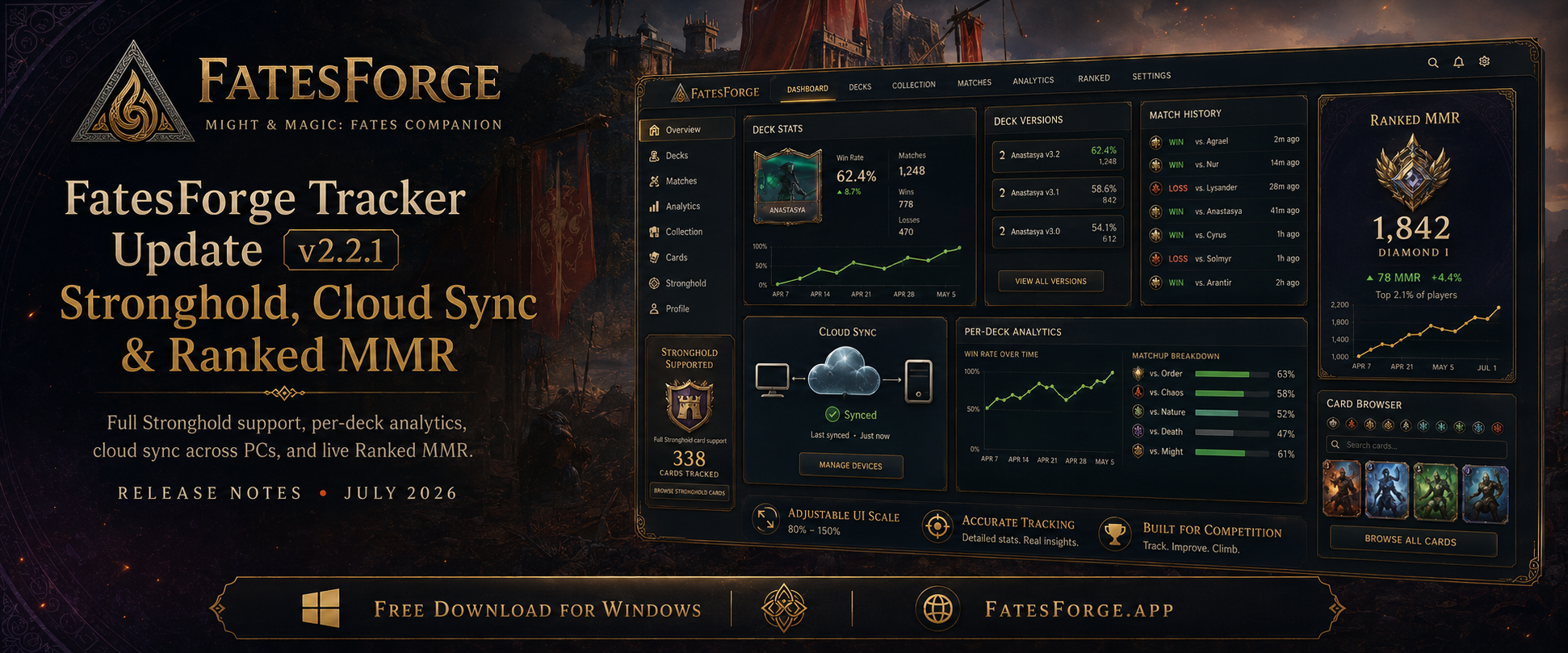
It's been a busy couple of months. Since our last big write-up (v1.0.5), the FatesForge Tracker has grown from a solid match logger into a full Might & Magic: Fates companion app. It now follows your entire collection across devices, tracks a brand-new faction, and surfaces your Ranked MMR at a glance.
If you're new here: FatesForge is a free desktop deck tracker and win-rate tracker for Might & Magic: Fates, the digital trading card game from Ubisoft. It tracks your matches in real time, builds and analyzes your decks, and shows a live in-game overlay of what's left in your deck and what your opponent has played. Think of it as an HSReplay equivalent for Fates.
Here's everything that landed between v1.0.5 and today's v2.2.1.
Download the Latest VersionDeck Stats, Rebuilt Around You
The single biggest leap was turning the Dashboard from a scoreboard into a full analytics tool. If you build and iterate on decks, this is where you'll live now.
Per-deck analytics
Click any deck on your Dashboard to open its full breakdown: card draw and play rates, matchup records by opponent hero and faction, and a recent match history. Filter it all by time period (7 days, 30 days, or All Time), or drill down to a specific deck version. If you're still settling on a list, our guide to the best decks in Might & Magic: Fates is a good place to start.
Automatic deck versioning
Edit a deck and the tracker versions it for you automatically. A gold EDITED badge flags decks with changes you haven't reviewed yet, and VIEW CHANGES walks you through the full v1 → v2 → v3 history, showing exactly which cards you added or cut, and when.
Mid-session deck edits
No more restarting the game to pick up a change. Save your edit in-game, play a match, and the new version shows up immediately. This was the number-one request after v1.0.5, and it's now done.
Deleted decks still count
Decks you delete in-game stay in your Deck Stats history, now marked with a clear red DELETED badge and their hero portrait intact, so your record stays complete.
The Stronghold Expansion, Fully Supported
When the Stronghold faction arrived in Fates, the tracker was ready for it on day one.
Full Stronghold support means the new faction, including hero Sandor, its faction cards, and the Earth spell school, is tracked, built, and displayed everywhere: Dashboard, Deck Stats, Overlay, and Card Browser.
The card database also grew to 338 cards, fully current with the latest game release, and we've kept adding the newest Stronghold cards as they roll out: Deep Roots, Nature's Fortitude, Enraged Cyclops, Blackskull Cyclops, Goblin Scout, and more. Whether you're theorycrafting a fresh Stronghold list or grinding an existing one, every card, hero, and matchup is accounted for.
Your Data, On Every PC
We wanted the tracker to feel like it belongs to you, not to one machine.
Full cloud backup. Everything the tracker knows, including matches, decks, deck versions, card stats, and settings, is backed up to the cloud. Reinstall or switch PCs and your complete tracker state comes back exactly as you left it.
Automatic match sync. New matches now sync in the background as you play, so your history and stats stay identical across every device you use. No manual export, no lost games.
Ranked MMR, At a Glance
The newest addition in v2.2.1 is live Ranked MMR tracking. Your current MMR now sits right on the Dashboard and updates as you play, so it's the first thing you see when you open the tracker instead of something buried in a menu. Pair it with our guide to climbing ranked in Might & Magic: Fates to turn those numbers into rating.
Quality-of-Life Wins Along the Way
A lot of smaller changes added up to a much smoother day-to-day experience:
- Adjustable interface size. Scale the entire tracker to fit your screen with
Ctrl +/Ctrl -, reset withCtrl 0, or pick an exact size under Settings > Display. Your choice is remembered between sessions. - Responsive layout. Panels, grids, and the nav bar now reflow to fit any zoom level or window size, so nothing gets cut off when you scale up.
- Tracking that just runs. Tracking starts automatically whenever the game is running. There's no button to manage, and the status indicator correctly reads Tracking active even if you open the tracker after the game is already up.
- Shorter, shareable deck codes. Deck codes are far more compact now and match the tidy My Decks format, with no more walls of text. Older codes you've saved still import fine.
- More reliable match tracking. Better deck detection across every game mode, including private matches, means fewer missed games and more accurate deck-to-match linking.
Behind the Scenes
Not everything is flashy, but it all matters:
- Per-card statistics are now consistent across every time filter.
- More accurate backend user counting and general stability work.
- Improved card hover previews with a short delay, so cursors gliding across the screen no longer flash tooltips everywhere.
- A more reliable auto-updater. Failed updates are now reported clearly instead of silently stalling, with a manual-download fallback if anything goes wrong.
How to Update
The tracker auto-updates on launch. Just open it and confirm the prompt, or use Settings → Check for Updates. Installing fresh? Grab the latest build from the download page and you'll be current with everything above. Your match history, decks, and settings carry over, with no re-login required.
Found a bug or want to request a feature? Use the in-app Messages tab. A lot of what shipped above started as community feedback. Thanks for tracking with us, and good luck on ladder.
Frequently Asked Questions
Is the FatesForge Tracker free?
Yes. FatesForge is a free deck tracker and companion app for Might & Magic: Fates on Windows. Download the installer, run it once, and tracking starts automatically whenever the game is open.
Does the tracker support the Stronghold faction?
Yes. Full Stronghold support is built in, including hero Sandor, the faction's cards, and the Earth spell school. The card database is current at 338 cards, and Stronghold decks are tracked, built, and displayed across the Dashboard, Deck Stats, Overlay, and Card Browser.
Will my match history transfer if I switch or reinstall on a new PC?
Yes. Matches, decks, deck versions, card stats, and settings are backed up to the cloud and sync automatically. Install FatesForge on a new PC, sign in, and your full tracker state pulls down exactly as you left it.
Can I see my Ranked MMR in the tracker?
Yes. As of v2.2.1, your current Ranked MMR is shown on the Dashboard and updates as you play, so you can see where you stand the moment you open the tracker.
How do I update to the latest version?
The tracker auto-updates on launch. Open it and confirm the prompt, or use Settings → Check for Updates. You can also download the latest installer from the download page. Your match history, decks, and settings carry over with no re-login required.