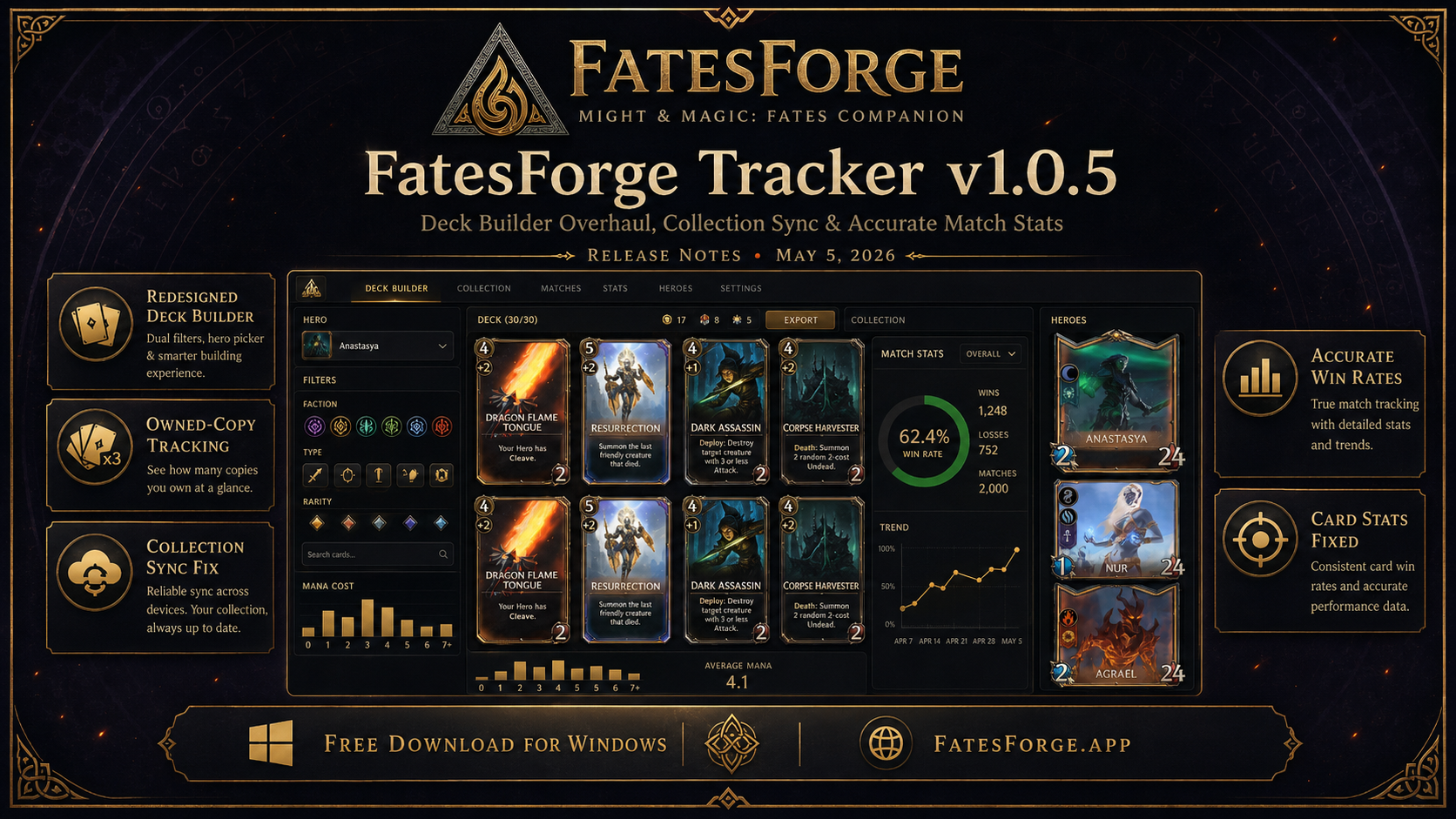
FatesForge Tracker v1.0.5 is now live. This release focuses on the two areas players use most: deck building and collection management. We rebuilt both from the ground up to match the in-game experience more closely, while also fixing long-standing bugs around card counts, match attribution, and per-card statistics.
If you're new here: FatesForge is a free desktop companion app for Might & Magic: Fates, the digital trading card game from Ubisoft. It tracks your matches in real time, shows draw probabilities and opponent plays via an in-game overlay, and stores full match history with detailed card-level statistics — like an HSReplay equivalent for Fates players.
Download v1.0.5 for WindowsDeck Builder, Rebuilt
The deck builder UI has been overhauled to match the in-game collection browser. Every change here came from player feedback — the old version worked, but it didn't feel like Fates.
Dual-dropdown filters (Card Type & Faction)
The card pool now uses the same dual-filter pattern you see in-game: pick a Card Type (Unit, Spell, Artifact, Building) and a Faction (Haven, Inferno, Necropolis, Academy, Neutral) independently. Filtering is instant and stays in sync with your hero's faction.
Hero picker with proper artwork
Hero selection now shows the correct hero portrait, automatically sets your deck's faction, and locks faction filters appropriately. Four heroes were added to the database in this release: Agrael (Inferno), Anastasia (Necropolis), Nur (Academy), and Slava Griffin (Haven).
Owned-copies tracking on every card
Each card in the deck builder now shows how many copies you own — as a small badge in the corner, styled to match the rest of the UI. When you're at the deck-building maximum (2 copies for normal cards, 1 for legendaries), the badge brightens with a checkmark so you can see at a glance which cards you can fully utilize.
"Owned only" filter actually enforces ownership
Previously, "Owned only" filtered the visible card pool but let you add more copies than you actually owned. Now it enforces the limit — you'll get a polite toast if you try to add a third copy of a card you only own once. Toggle the filter off to plan around future packs.
Penalty badge repositioning
The off-faction penalty indicator has moved to the bottom-left, where it doesn't overlap the new owned-copies badge or the card cost.
Collection Sync, Properly
This was the biggest behind-the-scenes change in v1.0.5. The previous collection sync had an issue where cards you sold or recycled never disappeared from your tracker. Your owned-card count would drift higher over time, even when your actual collection shrank.
v1.0.5 reworks the sync flow so the tracker now treats each collection update as a complete snapshot rather than something to merge with old data. The result: your tracker reflects exactly what's in your in-game collection, including sold cards, recycled cards, and dust transactions — no more drift.
Match Attribution Fixed — Your Win Rate Is Finally Accurate
This is the most impactful fix in v1.0.5, and it deserves its own headline. A long-standing bug caused the tracker to occasionally swap "you" and "your opponent" in match logs, producing inconsistent results — sometimes correct, sometimes flipped — depending on the specific match.
The practical effect: roughly half of all matches had attribution swapped. Cards your opponent played were sometimes logged as yours, surrenders could be miscounted, and per-card win rates ended up averaged toward 50% over time because each card's wins and losses were silently mixed with its mirror entries.
v1.0.5 ships a clean fix that anchors player identity directly to your authenticated account, eliminating the guesswork. New matches from this version onward will be attributed correctly, and the longer you play on v1.0.5, the more representative your stats become.
Card-Level Statistics Now Consistent Across All Time Filters
A regression from v1.0.4 caused per-card win rates and play counts to silently drop on certain time-period filters (e.g. "Last 7 days"). Different filter ranges were computing the same statistic in slightly different ways, with edge cases handled inconsistently.
v1.0.5 unifies the calculation across every time-period query. Stats are now consistent regardless of how you slice them — Last 7 Days, Last 30 Days, This Season, All-Time, or any custom range. If you noticed certain cards "missing" from your recent breakdowns, they're back, with correct counts.
Behind the Scenes
- Performance: Backend now deduplicates error logs and rate-limits telemetry, reducing noise from edge-case crashes.
- Messaging: The two-way support messaging system (General / Bug Report / Feature Request) gained unread badges and toast notifications.
- Promo / referral system: Monthly logs, mark-paid workflow, and CSV export now live in the admin dashboard.
- Reset Overlay Position: A new button in Settings → Overlay snaps the in-game overlay back to default coordinates if it ends up somewhere unexpected.
Known Issues & What's Next
A few things didn't quite make it into v1.0.5 and are queued for the next release:
- Restart-after-deck-edit: The tracker still requires a restart after editing a deck for changes to register in match-start tracking. This is on the immediate priority list.
- Mastered-only filter: The hero database needs the remaining ~30 heroes mapped to factions before this filter works correctly. Coming in v1.0.6.
- New cards rolling out: Ubisoft has staged a fresh wave of cards — including an entirely new Sylvan faction and the Necropolis hero Sandro. These will populate automatically as they go live in-game.
- Antivirus false positives: We've submitted the v1.0.5 binary to Microsoft, Avast, AVG, Kaspersky, ESET, and Bitdefender. VirusTotal is currently 0/69 detections, but if your AV flags the installer, please report it via the in-app messaging form so we can route the sample.
How to Update
The tracker auto-updates on launch. If you'd rather grab the installer directly, head to the download page and run the new FatesForge-Setup-1.0.5.exe. Your match history, decks, and settings carry over — no re-login required.
Found a bug or want to request a feature? Use the in-app Messages tab — every report goes directly to the dev queue. Thanks for playing, and good luck on ladder.